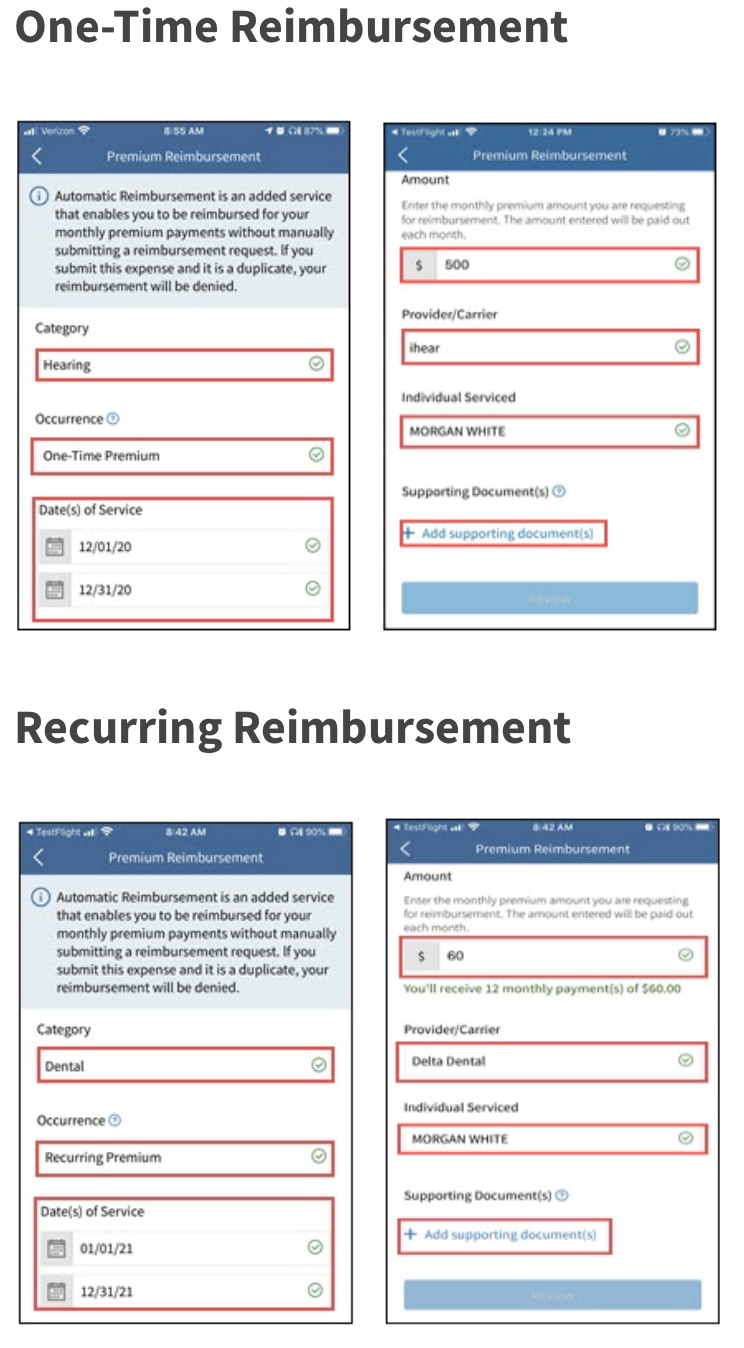
To submit a reimbursement request on the Via Benefits Accounts mobile app, complete these steps:
- Sign into the mobile app.
- Select Get Reimbursed.
- Select Out-of-Pocket Reimbursement (for copays, coinsurance) or Premium Reimbursement (for insurance premiums). Note: Your former employer or benefits provider may provide premium reimbursement only.
- Enter the following information:
- Category (e,g., Medical, Dental)
- Occurrence(One-Time Premium or Recurring Premium) for premium reimbursements only
- Note: One-Time reimbursement requests for premium expenses should be used in limited situations when:
- You paid in advance for future premiums, such as a Medicare Part B quarterly premium or a medical insurance annual premium
- You want to be reimbursed for premiums paid under COBRA
- Note: One-Time reimbursement requests for premium expenses should be used in limited situations when:
Type (e.g., Treatment, Equipment) for out-of-pocket reimbursements
Date(s) of Service
Provide the coverage dates for recurring and one-time premium requests (e.g., January 2022 through December 2022)
- Note: Premiums don't require a specific date of service because they're based on a full month
- Provide the dates for out-of-pocket requests. This can be a single date or a date span
- Note: Out-of-pocket expenses that cross calendar years must be submitted as two separate expenses
- Amount of your request
Provider/Carrier (e.g., Dr. Smith, CVS, Aetna)
Name of insured/Individual Serviced
Supporting Documents
Select Camera to take a picture of your document and upload it directly from your mobile device
Select Photos to choose an image from your phone’s photo library
Select Done when you've chosen the desired photo
Select Add to upload more photos
Select Review after you upload your documents.
Select Submit after you verify the information on your request, or select Edit to make changes.
Examples