
Comm100's Knowledge Base system allows you to create multiple knowledge bases. Each knowledge base is completely separate from the others. Being able to set up multiple knowledge bases is especially helpful, for example, when you are supporting multiple products. Having all articles in the same knowledge base can be confusing and even overwhelming for customers who are only using one product.
Create Multiple Knowledge Bases
- Log into your Comm100 account.
- Under the Knowledge Base product, click Advanced from the left menu list, and then click Multiple Knowledge Bases.
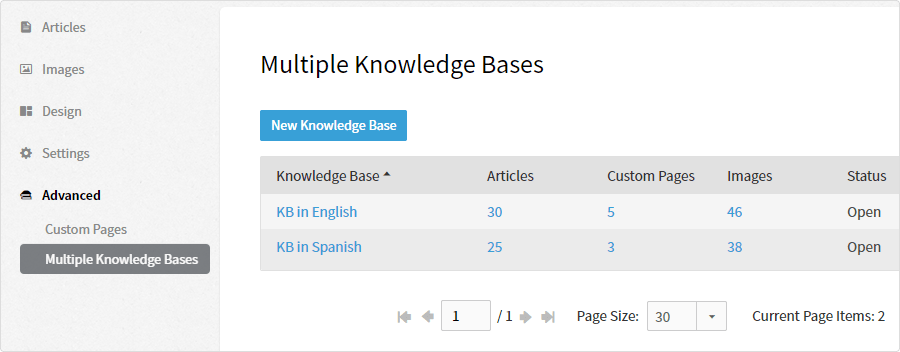
- Click the New Knowledge Base button, enter a name, and you're done.
You can then continue to customize the settings, build a repository of articles, integrate it into a live chat campaign, etc.
Each Knowledge Base Is Separate
Knowledge Bases are kept separately. Each knowledge base has its own:
- Status - open or close, and visibility - public or private.
- Home page, categories, articles, tags, images, and custom pages
- Integrated live chat campaigns
Great Ways to Use Multiple Knowledge Bases
- Provide an internal knowledge base for your employees and a public one for your customers
- Separate knowledge base articles between products, departments, branches, etc.
- Tailor each knowledge base to different customer bases
- Provide knowledge bases in different languages
Article version control in Knowledge Base allows you to track changes made to your articles over time. With version control enabled, you can:
- View the history versions of your articles.
- Save both the draft version and published version of an article at the same time.
- Unpublish an article to hide it from audiences while saving the draft in the system.
By default, article version control is disabled for new or existing knowledge bases. You can enable it to unlock the change tracking functionality. This article introduces the steps to enable version control and what you can do with version control.